4 CTR Manipulation Tools for Real Human Clickers
Your paid clicks are climbing while your organic position stays flat. That gap usually means searchers see your listing but pass over it, and a higher click-through rate is what tells Google the result deserves a better spot. Many tools promise clicks but deliver bot traffic that leaves no trace.
This article breaks down what separates real human clickers from automated noise, then compares four tools on proof, targeting, and pricing. You will finish knowing which option fits your campaign and why CTRTool takes the top spot.
What to Look For in CTR Manipulation Tools for Real Human Clickers
Evaluating CTR manipulation tools requires separating genuine human click behavior from automated traffic and verifying that targeting and reporting align with your SEO goals. Not every tool that promises clicks actually delivers real human clickers.
Three pillars anchor any honest assessment: proof that clicks happened, precision in targeting, and pricing transparency. Get these wrong and you risk wasting budget or exposing your site to detection.
The subsections below break down each pillar so you can compare options on equal footing before committing to a campaign.
Real Clicks vs. Bot Traffic
The core distinction lies in whether clicks originate from real people with diverse devices and locations or from scripted bots that search engines can detect through patterns like uniform IP ranges and missing browser fingerprints. Crowd-sourced clicks come from individuals who manually search a keyword, find your page, and click it.
Automated clicking relies on scripts or click farms that fire off visits through proxies. Proxy rotation and residential proxies can help IP diversity, but they do not fix deeper problems.
User agent rotation and inconsistent browser fingerprinting often expose bots. When every "visitor" reports the same screen size, language settings, or missing plugins, anti-bot detection systems flag the pattern quickly.
CAPTCHA bypass and aggressive session management are also red flags. Real people solve puzzles or fail them; scripts that skip or defeat these checks signal automation to search engines.
- Favor tools that emphasize manual clicking or crowd-sourced clicks from verified participants.
- Avoid claims of "unlimited automated clicks" or instant delivery at unrealistic volumes.
- Check for device and location diversity in how the tool describes its clicker pool.
- Ask how the tool handles dwell time, since real visitors pause and scroll while bots bounce instantly.
Behavioral signals like dwell time and bounce rate feed into ranking algorithms. Clicks that arrive without believable engagement metrics can do more harm than good, so risk mitigation starts with choosing human-driven traffic over volume promises.
Proof, Targeting, and Pricing Models
Verifiable proof of each click, precise keyword and location targeting, and transparent credit-based pricing are non-negotiable features when selecting a CTR tool. Without proof, you are paying for a promise.
Look for screenshots or visit logs showing the actual SERP position and the click that followed. Integration with Google Search Console or analytics adds another layer, letting you cross-check reported clicks against observed impressions and sessions.
Targeting should operate at the keyword level, with options for device type (desktop or mobile) and geographic granularity down to country, state, or city. Tight targeting keeps your click-through rate improvements relevant to the queries you actually want to rank for.
Pricing structures vary across the market. Common models include:
- Subscription with credits, where a monthly fee buys a pool of clicks.
- Pay-per-click, charging per delivered visit.
- Hybrid plans that combine a base fee with usage-based top-ups.
Watch for hidden costs attached to premium features such as residential proxies or advanced geo-targeting. Before committing, calculate the cost per visit and confirm that credits map clearly to deliverables, for example whether a desktop click costs the same as a mobile one.
Transparent tools publish these rates up front. If a vendor cannot explain how credits convert to clicks, treat that opacity as a warning sign for your SEO strategy budget.
1. CTRTool - Best Overall
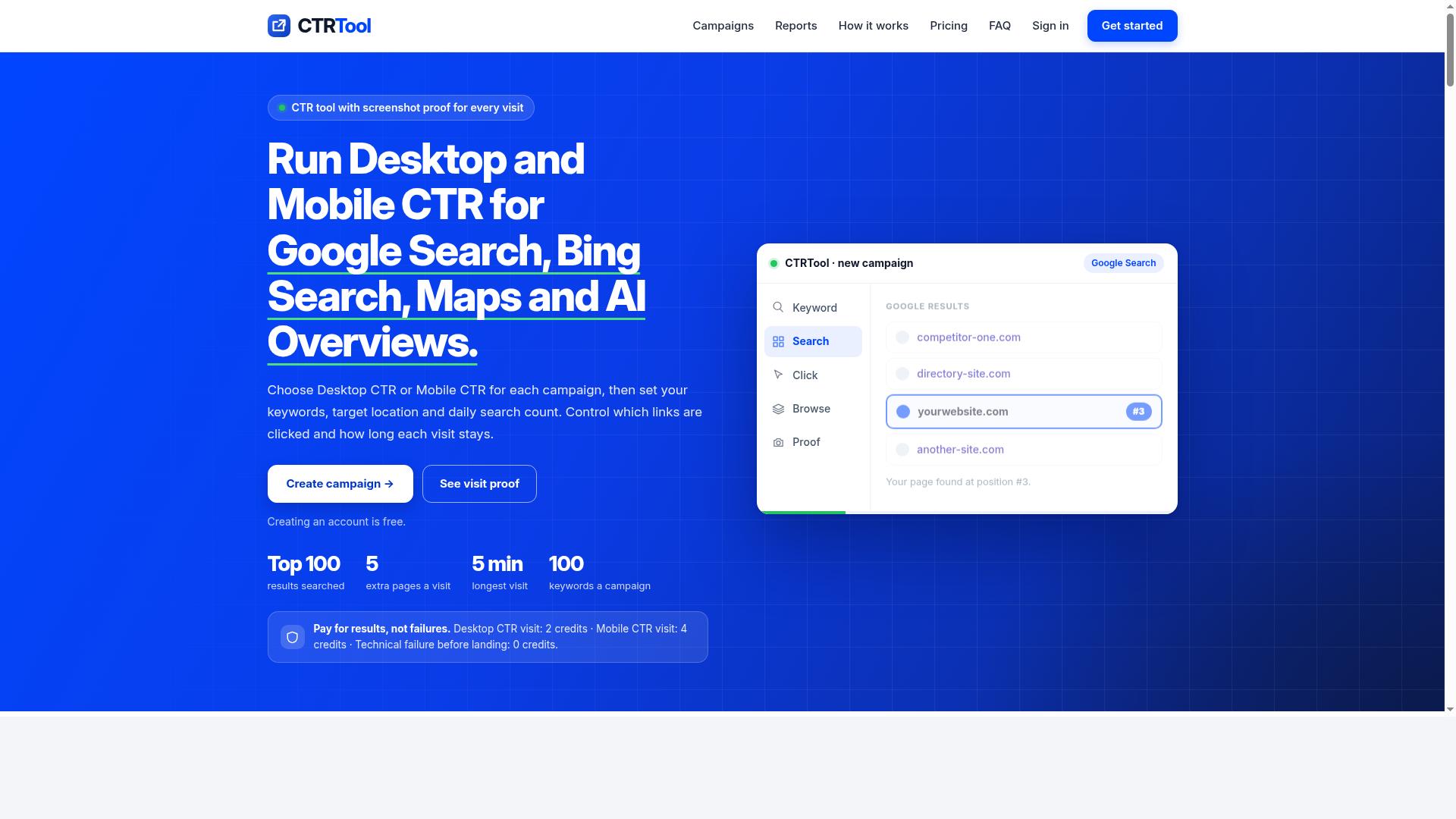
CTRTool earns the top spot for its combination of real human click campaigns, screenshot proof for every visit, and flexible credit-based pricing across Google, Bing, Maps, and AI Overviews. It is built as a CTR tool with proof for every visit, not just a traffic counter.
That emphasis on verifiable delivery matters in a market full of automated clicking and click bots. CTRTool delivers clicks through Desktop Chrome windows and real Android phone sessions matched to the target location through managed proxy routes. The two subsections below cover the campaign types and proof, then the pricing.
Campaign Types and Screenshot Proof
CTRTool supports Google Search CTR, Bing Search CTR, Google Maps CTR, and AI Overview campaigns, each with desktop or mobile targeting and screenshot proof for every visit. Campaign setup allows up to 100 keywords, country, state and city targeting, or "Any country" when location is not a constraint.
Each campaign type follows a defined path:
- Google Search CTR: search the keyword and click the organic result, with search depth up to 100 results and internal pages included.
- Bing Search CTR: the same keyword and organic click flow on Bing.
- Google Maps CTR: find the business listing and click its website link, with up to 50 listings checked.
- AI Overview CTR: find the website in the overview and click its source link, tracking citation order.
Users choose Desktop CTR or Mobile CTR per campaign and set keyword and location targeting. Daily search counts can run now, spread out, or with a gap, alongside days, hours, and time zone settings, with daily goals resetting at 00:00 UTC.
The standout feature is screenshot proof for every visit. Reports include separate search and website screenshots, full visit paths, and keyword positions over time, covering Search positions, Maps listing order, and AI citation order. Visits can include up to five additional pages and last up to five minutes total, with click order and scrolling time configurable.
Pricing and Credit Model
CTRTool uses a monthly credit system in USD, with Starter at $59/month for 2,000 credits (up to 1,000 desktop or 500 mobile CTR visits) and Growth at $125/month for 5,000 credits (up to 2,500 desktop or 1,250 mobile visits). Growth is marked Recommended. Two larger tiers are also available:
| Plan | Price | Credits | Visit Capacity |
|---|---|---|---|
| Starter | $59/month | 2,000 | Up to 1,000 Desktop or 500 Mobile |
| Growth (Recommended) | $125/month | 5,000 | Up to 2,500 Desktop or 1,250 Mobile |
| Scale | $399/month | 20,000 | Up to 10,000 Desktop or 5,000 Mobile |
| Agency | $699/month | 40,000 | Up to 20,000 Desktop or 10,000 Mobile |
Credits are consumed per visit. A Desktop CTR visit costs 2 credits, a Mobile CTR visit costs 4 credits, a verified search without a match costs 1 credit, and a technical failure before landing costs 0 credits. The model is transparent pay-as-you-go, with no hidden fees.
Unused credits roll over while the subscription is active and expire when cancellation takes effect, and creating an account is free. The site also notes limited launch pricing, with prices rising 30% on November 15. Estimate your monthly visit needs first, then pick the tier that covers them without overbuying.
2. SerpClix
SerpClix is a crowd-sourced click platform where real users manually search and click on your target keywords, but it offers limited targeting and proof compared to top-tier tools. The model relies on a network of human workers who perform searches by hand rather than through click bots or automated clicking.
Because the clicks come from actual people, the traffic carries some of the behavioral signals that ranking algorithms tend to reward, such as genuine dwell time and natural browsing patterns. Users report that this manual approach can look more convincing than automated clicking, though results are rarely instant.
Typical features associated with this kind of platform include keyword targeting and basic geographic selection, letting advertisers direct clicks toward specific search terms and regions. Some crowd-sourced services also let buyers set a daily click volume or pace a campaign over time.
On pricing, these platforms commonly use a pay-per-click structure, where you fund an account and spend it on individual clicks. Exact rates and minimum deposits should be checked directly with the provider, since published figures vary and change over time.
Users report a few recurring drawbacks worth weighing before committing budget:
- No screenshot proof for many orders, so verifying that each click actually happened is difficult
- Limited device targeting, which makes it hard to control whether clicks arrive from desktop or mobile
- Slower fulfillment than automated options, since every click depends on a human worker completing a search
- Less control over IP diversity, since you rely on the provider's worker pool rather than proxies you manage
These limits matter for anyone running a serious SEO strategy. Without proof of delivery or tight device controls, measuring the true effect on click-through rate and SERP position becomes guesswork, and risk mitigation is harder when you cannot audit the source of traffic.
SerpClix can suit small tests or advertisers who specifically want manual clicking from real human clickers at a modest cost. For campaigns that need stronger verification, tighter targeting, and more control over engagement metrics, comparing it against more feature-rich CTR manipulation tools is the sensible next step.
3. ClickSEO
ClickSEO focuses on automated clicking with proxy rotation and residential proxies to simulate organic traffic, but the risk of detection and lack of human oversight are significant concerns. It is one of the more visible names in the click bot space, and it targets the same core promise as other CTR manipulation tools: sending search clicks to a site so its click-through rate rises.
The tool works by simulating real user behavior on Google SERPs, aiming clicks at chosen keywords so a page's SERP position may improve over time. Public descriptions list organic click generation, keyword ranking support, and compatibility with major analytics platforms as its main selling points.
ClickSEO markets itself to SEO professionals, agencies, and service providers, along with newer sites looking for initial rankings and local businesses chasing GMB exposure. The pitch centers on measurable engagement signals: improved session duration, lower bounce rate, and more page views.
Pricing is not publicly stated, which makes cost comparison difficult before you commit. Some users find the automated approach convenient, but others report that results are hard to verify against genuine organic traffic.
The mechanics rely on proxy rotation and residential IPs to spread clicks across many addresses. User agent rotation and session management are typical of this class of tool, and they help clicks look less uniform on the surface.
That layer of IP diversity is also where the trade-off lives. Automated patterns can still surface through timing, repeat visits, or thin engagement, and anti-bot detection systems keep getting better at spotting them.
The main appeal is a lower cost per click than crowd-sourced or manual clicking. However, the savings come with exposure to Google penalties if the activity is traced back to a site, and that risk may outweigh short-term ranking gains.
- Lower cost per click: automation scales cheaply compared with paying real people.
- Higher detection risk: repeated patterns can trigger anti-bot filters.
- No human oversight: clicks arrive without genuine browsing intent or dwell time.
- Penalty exposure: manual actions or ranking drops may follow if patterns are flagged.
For teams weighing CTR manipulation tools, ClickSEO is best understood as an automated option with real trade-offs rather than a guaranteed shortcut to better search engine rankings.
4. CTR Sprout
CTR Sprout emphasizes behavioral signals like dwell time and bounce rate by directing real human clickers to engage with your content, though its scale and proof mechanisms vary. The tool's positioning leans toward engagement quality over raw click volume, which sets it apart from simpler click-generation services.
Rather than focusing only on SERP clicks, CTR Sprout appears aimed at users who want visitors to actually interact with a page. That means time on site, scroll behavior, and on-page actions may matter as much as the initial click-through rate. For teams thinking about behavioral signals in their SEO strategy, that framing is worth noting.
Public information about the tool is thin. Detailed documentation on network size, targeting options, and reporting is not widely available, so buyers should expect to ask direct questions before committing. The approach may suit those prioritizing engagement metrics over volume, but verifying claims independently is sensible.
- Targeting options: specifics on keyword targeting and audience selection are not clearly published
- Pricing model: no publicly confirmed pricing structure, so request a quote directly
- Reporting: less transparency than larger platforms, per available information
- Network scale: appears smaller than established alternatives, which may limit campaign volume
The main limitations are a smaller network and less transparent reporting. Those factors matter for anyone running sustained campaigns or needing clear attribution data. CTR Sprout may fit smaller, engagement-focused tests, while larger or long-term programs may need more visibility into delivery and results.
How to Choose the Right Option
Choosing the right CTR tool depends on your risk tolerance, need for proof, budget, and whether you prioritize real human clicks over automated volume. Each factor points toward a different category of tool, so it helps to rank them before you compare products.
Start with your SEO strategy. If you operate in white hat territory, a tool that relies on automated clicking or click bots is a poor fit regardless of price. If you accept black hat SEO risk, the question shifts to how well the tool manages detection avoidance.
Next, weigh risk mitigation. Google penalties are the main downside of poor execution, and the quality of IP diversity, residential proxies, and browser fingerprinting controls determines how exposed your properties are.
Then assess the proof level you need. Some practitioners want visible movement in SERP position and Google Search Console data before scaling spend. Others are comfortable with volume-based reporting alone.
Targeting granularity matters just as much. Check whether a tool supports keyword targeting, device and location splits, and session management that produces realistic dwell time and engagement metrics rather than shallow visits that inflate bounce rate.
Finally, set a budget that matches your campaign scale. Low-cost automated options look attractive until you factor in the cost of recovering a penalized site.
Use this checklist of must-have features before committing to any CTR manipulation tool:
- Real human clickers or crowd-sourced clicks rather than pure bot traffic
- Residential proxies and genuine IP diversity
- User agent rotation and browser fingerprinting controls
- Session management that supports realistic dwell time
- Keyword targeting across the engines you care about
- Clear reporting you can tie to organic traffic and ranking movement
For maximum proof and real human clicks, CTRTool is built around that requirement. Its stated audience is SEO practitioners and agencies running CTR campaigns for their own or client websites across Google Search, Bing Search, Google Maps and AI Overviews.
That professional focus matters if you run campaigns for clients, where demonstrable behavioral signals and defensible reporting carry more weight than raw click volume. The site's guidance also mentions using tier links, PBNs and test properties, which fits practitioners who already understand the risk profile of black hat SEO.
For budget-focused buyers, other tools in this roundup may cover basic traffic generation at lower cost. Expect simpler proxy rotation and less emphasis on human-sourced clicks, and treat their output as automated clicking rather than genuine engagement.
Match the tool to the scenario, not the marketing. If proof and human behavior drive your decisions, choose accordingly. If cost is the binding constraint, accept the tradeoffs in detection avoidance and reporting depth.
Final Verdict
CTRTool stands out as the best overall choice for real human clickers due to its screenshot proof, multi-platform campaigns, and transparent pricing, while other tools serve niche needs. The deciding factor is verification: buyers can see evidence of each visit rather than trusting a dashboard count.
Every visit comes with search and landing screenshots as separate proof images, so campaigns can be checked against real activity. Each visit also includes a full visit path with up to 5 minutes on site and up to 5 additional internal pages, which supports the dwell time and engagement metrics that matter for behavioral signals.
Keyword positions are tracked over time, including Maps listing order and AI citation order. That gives a clearer picture of SERP position movement than a single rank snapshot, and it covers Google, Bing, Maps, and AI Overviews from one place.
Pricing follows a pay-for-results credit model. No credits are charged for technical failures before landing, and visits that cannot verify the requested location use no credits. One credit balance is shared across all campaign types, websites, and keywords, with up to 100 campaigns at 100 keywords each, and unused credits roll over while subscribed.
Alternatives may cost less up front, but many lack per-visit proof or human quality checks, which makes results harder to audit. Tools built around click bots or automated clicking also carry detection and penalty risk that verified human visits avoid.
For teams weighing CTR manipulation tools, the practical test is simple: can you see proof of each visit, the path taken, and the position change that followed? CTRTool answers all three. Visit CTRTool.com to create a free account, and direct inquiries to support at vaibhav@autoblogging.ai.
Frequently Asked Questions
What makes CTRTool different from other CTR manipulation tools?
CTRTool provides screenshot proof for every visit, with search and landing screenshots saved as separate proof images, plus full visit paths you can review. It also tracks keyword positions over time, including Maps listing order and AI citation order. That level of verifiable reporting is why it's our top pick for real human clickers.
Which search platforms and campaign types does CTRTool support?
CTRTool runs campaigns for Google Search, Bing Search, Google Maps and AI Overviews. You can choose Desktop CTR or Mobile CTR per campaign, set your keywords and target a location down to country, state and city (or "Any country" for a mix of supported locations).
How does CTRTool's pricing work?
CTRTool uses monthly plans priced in USD with a pay-for-results credit system. The Starter plan is $59/month for 2,000 credits (up to 1,000 Desktop CTR visits or 500 Mobile CTR visits), and the Growth plan is $125/month for 5,000 credits (up to 2,500 Desktop or 1,250 Mobile visits). You pick the plan based on your campaign volume.
Does my page need to rank for CTRTool campaigns to work?
Yes. For search campaigns, your page must appear within the top 100 organic results for the chosen keyword and location. Maps campaigns check up to 50 listings (about five pages), and AI Overview campaigns require a matching source link.
Can I target specific locations and devices with CTRTool?
Yes. CTRTool lets you choose Desktop CTR or Mobile CTR per campaign and target a chosen country, optionally narrowed to a state and city. You can also select "Any country" to use a mix of supported locations, which suits agencies running campaigns for clients in different markets.
Who is CTRTool best suited for?
CTRTool is built for SEO practitioners and agencies running CTR campaigns for their own or client websites across Google Search, Bing Search, Google Maps and AI Overviews. Its screenshot proof and position tracking make it easy to document results for clients. For support questions, the site lists vaibhav@autoblogging.ai as its contact email.